Here is a video of Abbey’s Fav reading and spelling apps. Mom’s favorites are the ones that are customizable that I can add words and pictures of words we are working on. Thankfully I have found some that are both of our favorites! So, check out the video and see what they are and watch Abbey playing them!
Proloquo2Go has an amazing feature called “List View.” It’s a way of putting the buttons in a vertical list instead of a grid. This helps Abbey figure out that it’s sequential, I think. It’s helped her most with directions, especially with how to cook boxed rice, like the video I posted on here in January.
Oh, and I also included how to “Hide” a button, and why, how we use that, very handy and easy!
So, here is a video of all the ways we use this feature, to help Abbey. Click on the video below to watch!:)
Yes, it’s been a long, hard road…but nothing has been more rewarding! Watching Abbey slowly, gradually be able to tell us more and more, nothing is more amazing! So, I get asked A LOT how we taught Abbey, how we started, what we used and how we have her Proloquo2Go set up. So, I tried to put it all together in a video, hoping that it will help and encourage people to get started and get some good ideas! Hope it helps!
Ok, first of all before you watch the video, be aware, there is a really loud squeal, so prepare yourself. No, it’s not from Abbey, it’s from me! Abbey has never, ever said the word “mom”, verbally before or on her iPad without prompting! Once again, had to do with food…but I so don’t care.:) Yes, hearing that was simply amazing, beyond words! I wish I could take credit for that one, but the school is where they have been working hard on her adding the person’s name that she’s talking to…I just love that! And, she’s not only figuring it out, her skill is transferring to home so well! I’m so proud of her! So, here it is, the short, but very sweet video…again, sorry if I hurt your ears.:)
Click on the very short, but very sweet video below, to watch the miracle!
Ok, there are several ways that you can transfer your vocabulary from one device to another, but this seems to be the easiest, for myself. So, here’s a quick video of how I do it….Hope it helps!:) Just click on the short video below! AND, then the video below is how to e-mail the vocabulary to someone else, like their teacher.:)
Child Proof Proloquo2Go…please pass on to Proloquo2Go users!!
Also folks wanting to use Guided Access, Part 2 is a must watch!:)
I get asked very frequently how to child proof Proloquo2Go, so I made a couple of quick videos to show you how! Please share with anyone using Proloquo2Go, so that they can keep all of their work safe!
Here’s the first one! Just click on the videos to view them!
Here’s Part 2: Child Proofing Proloquo2Go, using Guided Access, disabling parts of the screen…anyone using apps with kids could use this one!!:) You learn how to use Guided Access, along the way, too!
I also end the video with how to enable restrictions so that kids can’t delete apps, install apps or in app purchases.
Hope this helps!
Check out our other videos of how we are helping Abbey grow and learn with Proloquo2Go and ‘her’ review on many, many apps!:) http://www.youtube.com/famof6
Ok, I’ve posted about Pictello before, how we use this app for social stories, teaching Abbey what to expect, what to do in situations. So, we’ve got stories about Going to the Dentist, for example.
We also love Pictello because it has opened up a new world for Abbey. She figured out that she loves to look at pics of herself and her family doing things. So, I make stories about our trips, about new things she does and experiences, so she can look at it all again!
Well, yes, Pictello just got even better! Not only is it very simple to use, for myself and for Abbey…but now, YES, you can ADD VIDEOS!! Wow, to see Abbey’s face, the first time she opened up one of her stories, clicked on a page and it was a video….priceless! She started off with a huge grin and then was just giddy! It adds another whole dimension! So, now to think about ways we can use this new feature to help her learn and grow….
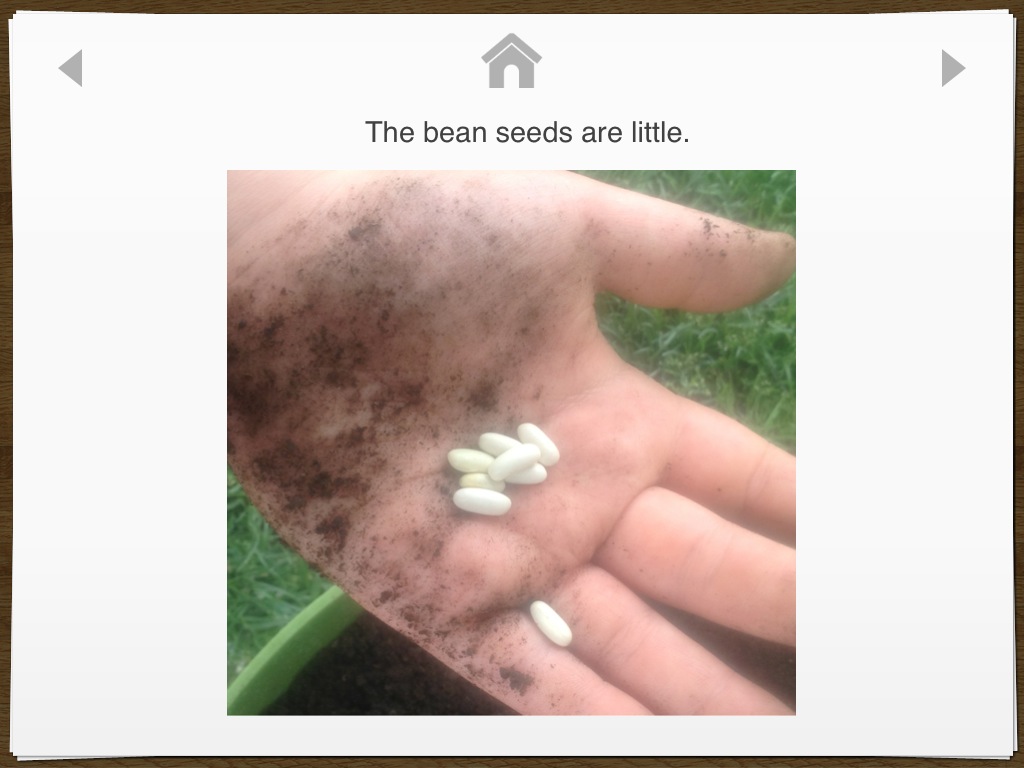
Here’s a pdf, Growing Beans, of one short, simple story I made using Pictello, of us planting bean seeds. I hope to use it again next year and see what she can do without my help! The page in the story without words, is actually a video,:) If you have Pictello, we can share stories! I can send you a Pictello link of a story that you can put on your Pictello, to look at and use, if you’d like.:) Just let me know!
Well, for some reason teaching quantity, for Abbey, has been a huge challenge. So, finding apps that she likes that can help with this has been a lot harder than, say, word apps, tracing apps, etc..
Watch a video of her playing with her fav ones…Click here! Or just click on the video below, to view it!
The pics shown are from the app, Critter Doodle Math: Numbers. There are lots of activities, but by far, Abbey’s fav activity is the tracing. I am pretty sure it’s because you pop the bubbles as you trace the number, but then the cool part is that, as you see below, when they are finished tracing the number, bubbles come up to pop and count, for each number. That’s a very motivating way for Abbey to learn quantity!
One of the other great activities is teaching largest to smallest, big and small. This has also been a hard concept for Abbey and she enjoys this activity as well!
I always get excited when a new app comes along that totally intrigues Abbey! This one, for the iPad, called Writing Wizard, did the trick!! It has so much to offer, things that kids love like fun interactions and things that us parents love, like amazing customization, detailed reports on how they are doing AND, it’s free today!!
It’s a really fun one..check it out!:) Here’s a video of us playing with it!
Abbey is doing it, she’s learning to use sentences! Here’s a video of her asking for waffles..
I’ve been talking to the gals working with Abbey about how to teach her to do this and we’ve been brain storming, then at our last school meeting, the school team and I came up with which words to add to start with, to start the process. It sure has been a long road to get here, but it’s so cool to see her catch on so well! It sure takes a village! Here’s a screen shot of Abbey’s ‘home page’ with the words we added.
Here’s the screen shot of her asking for waffles. In the video, you can see how easily she navigates to find what she wants, another long work in progress! Proloquo2Go is so amazingly easy to add whatever we want and however we need it on there!
So, we used to have just one button for ‘I want’, we started by separating that into two. The school had already really been working on having her add on ‘please’ to the end of her requesting sentences, to that part was easy for her. Then we added ‘to, a, and the’, which I think will take a bit longer for her to learn to use. So, what do you think?:)
Thank you so much for everyone’s help and support, including Abbey’s ‘team’ and the folks at Proloquo2Go!
Don’t forget to check out Abbey’s other videos, there’s a link to them on the home page!


 abbeysvoice