Ok, there are several ways that you can transfer your vocabulary from one device to another, but this seems to be the easiest, for myself. So, here’s a quick video of how I do it….Hope it helps!:) Just click on the short video below! AND, then the video below is how to e-mail the vocabulary to someone else, like their teacher.:)
Category Archives: communicating
Child Proofing Proloquo2Go & Using Guided Access…Did you know you could disable parts of the screen?
Child Proof Proloquo2Go…please pass on to Proloquo2Go users!!
Also folks wanting to use Guided Access, Part 2 is a must watch!:)
I get asked very frequently how to child proof Proloquo2Go, so I made a couple of quick videos to show you how! Please share with anyone using Proloquo2Go, so that they can keep all of their work safe!
Here’s the first one! Just click on the videos to view them!
Here’s Part 2: Child Proofing Proloquo2Go, using Guided Access, disabling parts of the screen…anyone using apps with kids could use this one!!:) You learn how to use Guided Access, along the way, too!
I also end the video with how to enable restrictions so that kids can’t delete apps, install apps or in app purchases.
Hope this helps!
Check out our other videos of how we are helping Abbey grow and learn with Proloquo2Go and ‘her’ review on many, many apps!:)
http://www.youtube.com/famof6
Abbey’s getting it, using whole sentences, look at her go!:)
Abbey is doing it, she’s learning to use sentences! Here’s a video of her asking for waffles..
I’ve been talking to the gals working with Abbey about how to teach her to do this and we’ve been brain storming, then at our last school meeting, the school team and I came up with which words to add to start with, to start the process. It sure has been a long road to get here, but it’s so cool to see her catch on so well! It sure takes a village! Here’s a screen shot of Abbey’s ‘home page’ with the words we added.
Here’s the screen shot of her asking for waffles. In the video, you can see how easily she navigates to find what she wants, another long work in progress! Proloquo2Go is so amazingly easy to add whatever we want and however we need it on there!
So, we used to have just one button for ‘I want’, we started by separating that into two. The school had already really been working on having her add on ‘please’ to the end of her requesting sentences, to that part was easy for her. Then we added ‘to, a, and the’, which I think will take a bit longer for her to learn to use. So, what do you think?:)
Thank you so much for everyone’s help and support, including Abbey’s ‘team’ and the folks at Proloquo2Go!
Don’t forget to check out Abbey’s other videos, there’s a link to them on the home page!
Grab Opportunities to Teach…Even When They’re Throwing up!
Well, I had a much different blog post in mind this morning, guess we’ll save that one for another day. I woke up to the sound of Abbey throwing up. My first reaction was, ‘oh, my poor Abbey’, but then my second…’Ohh ohh, I can teach her how to tell me she has to throw up!’
Yes, you have to grab those opportunities to teach them to communicate when they come up! That is an important lesson I have learned over the years, with Abbey. There are so many things she won’t understand me trying to teach, unless they are happening, like something hurting, being angry or like today, throwing up. If I tried to teach her how to communicate these things to me when they were not happening, she wouldn’t get it.
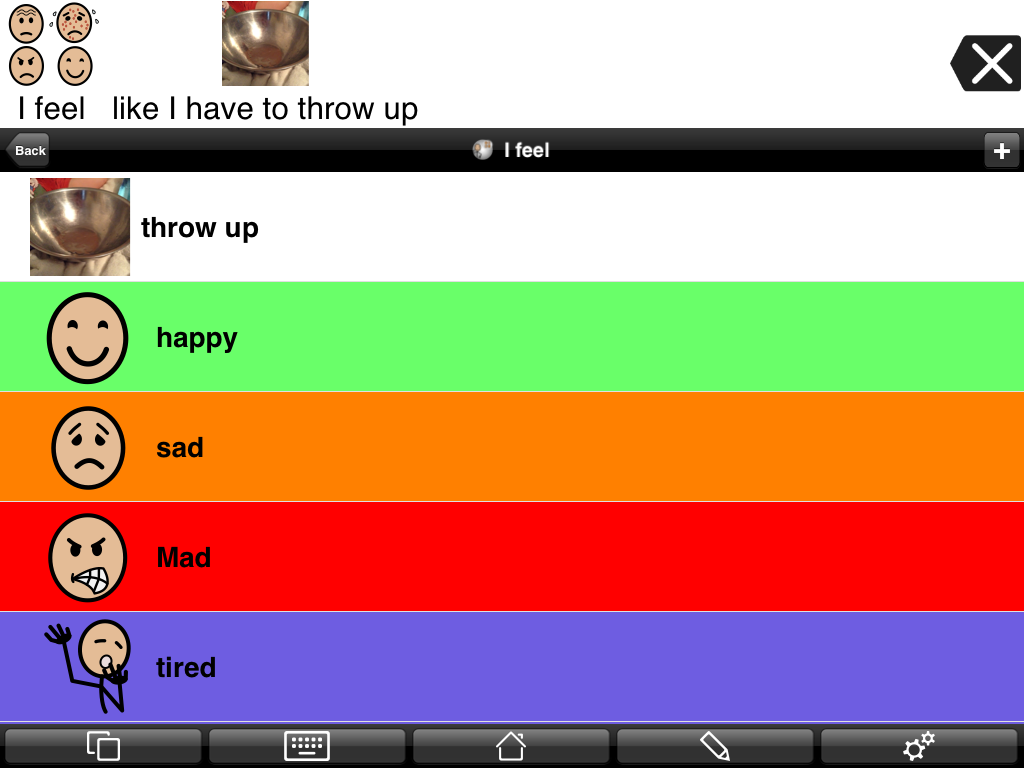
So, she has an “I feel” button on her home page of Proloquo2Go, that has feelings like happy, sad, angry, etc.. I once again used “list view,” another great opportunity to use this feature. And, I made some of the buttons different colors, like happy is green, angry is red, tired is blue, hungry and sick are blue too, etc.. (She has to scroll down to get to some of them.) This morning we added the ‘throw up’ button, that speaks “like I have to throw up” when she presses it. I moved it up to the top for easy access for today. There is a great picture in Proloquo2Go’s picture library of a sick face beside a toilet, for a ‘throw up’ button, but I had to go with a picture of our ‘throw up bowl’ as Abbey doesn’t understand to throw up in the toilet yet. Last time she was sick was when we taught her to use a bowl, which was a wonderful thing!:)
I actually put a ‘hurt’ button in her ‘body parts’ folder and in her ‘feelings’ folder. Last time her ear hurt, we went to her body parts folder and worked on communicating that her ear hurt.
So, what opportunity do you have today, to teach your little one to communicate? Grab them while you can!
(Don’t forget to ‘follow’ my blog to get all our blog posts! Button up on the top, right)